
Search the category name and you get a list of platforms, a comparison table and a lot of confident scoring out of ten. What you rarely get is the thing you actually needed first: a plain description of what this software is supposed to do, which parts of your week each module is aimed at, and which parts of your week nothing on the list touches at all.
That gap matters most for one specific reader, and this article is written for them. Not the host with two apartments, whose needs are genuinely simpler. The person running units for other people: five, twenty, forty homes that belong to owners who expect a statement, an answer and a reason. For that reader the software question has two halves, and the entire category is built around only one of them.
The half everyone sells is the booking: calendars, channels, rates, guest messages, turnovers, payouts. The half nobody sells is the business: the owner who is thinking about switching managers, the enquiry that came in on WhatsApp at eleven at night, the management agreement that needs signing, the invoice for the linen that has nothing to do with a reservation. Below is the honest map of both, the stack question that follows from it, and the section that gets skipped in every buyer guide: what switching actually costs and the order in which you should do it. If you want the applied version of the second half, the vacation rental CRM page covers the business layer directly.
Vendor pricing models are described as published or as commonly reported by independent reviewers as of September 2026. Confirm current figures on each vendor's own pricing page before you buy anything.
The three layers, drawn properly
Picture the category as three stacked layers rather than one product. Reading it this way explains most of the confusion in the market, because vendors compete inside a layer and then market as if they covered all three.
The distribution layer sits at the top. It faces the outside world and its job is that a night sold is a night closed everywhere. It contains the channel manager, the unified availability calendar, nightly rates and rate rules, listing content that pushes out to the channels, and usually a direct booking engine with a website attached. When something breaks here, a real guest arrives at a house that already has someone in it, which is why this layer gets the most engineering attention and the most caution during a migration.
The operations layer sits in the middle. It faces your team and your guests. Reservations and their lifecycle, the guest inbox pulled in from every channel, automated messages before, during and after the stay, turnover scheduling against the checkout calendar, cleaning checklists and photo verification, maintenance and inspection tickets, and the payment handling that turns a booking into money. This is the layer that grows fastest with property count, because every additional home adds turnovers, messages and small failures rather than adding just one row to a list.
The owner layer sits at the bottom, and it is mostly empty. It faces the people who pay you to exist. It contains the homeowner as a relationship rather than as a payout line: the pipeline of owners you are pitching, the follow-up you owe them, the management agreement and its renewal date, the onboarding checklist for a new property, the monthly conversation about performance, the invoicing that is not a booking payout, and the reporting an owner actually reads. Most platforms represent this layer with an owner portal and a statement generator, which is the output of the relationship rather than the relationship itself.
The practical consequence is that a manager who buys only the top two layers ends up running the third one out of a phone, a notebook and a memory. That works at five properties. It fails somewhere between fifteen and thirty, and it fails silently, because nobody sends you an alert when an owner quietly starts talking to your competitor.
What each module is actually for
Feature lists describe modules. They rarely explain what job each one is doing, which is what tells you whether you need it yet.
Channel manager. Synchronisation, and nothing else. Availability, rates and reservations move between your system and the listing sites so a booking on one closes the dates on the others. Judge it on which channels it supports natively, how fast the sync is, and what happens when it fails. Almost every platform in the category includes one now, so it is rarely a separate purchase, but it is still the component whose failure costs you the most.
Unified calendar. One view of every unit and every night. Useful from property number three, indispensable by property number ten, and the single thing most likely to make a spreadsheet-based operator switch.
Rates and pricing rules. Base rates, seasonal adjustments, minimum stays, gap rules, last-minute discounting. Note that this is not the same as a dynamic pricing tool, which sits alongside your platform and moves rates against live demand. Most managers end up with both.
Direct booking engine and website. A channel you own, without commission. The engine matters less than the traffic: a booking site with no visitors saves you nothing, which is why direct booking is a marketing project with a software component rather than the other way around.
Guest inbox and stay messaging. Every channel's messages in one thread, plus a sequence that fires on booking, before arrival, mid-stay and after checkout. This is the module that most reliably pays back its own cost in saved hours.
Turnover and cleaning operations. Cleans scheduled from the checkout calendar, assigned to a cleaner, with a checklist and photo proof. Light versions live inside most platforms; specialists exist for a reason once you have a real cleaning team.
Maintenance and inspections. A broken boiler needs an owner, a due date and a record that it was fixed. In small operations this lives in a group chat and gets lost.
Payments, fees and payouts. Taking guest money, splitting the commission, handling deposits and damage, paying the owner. Where trust accounting is required by local regulation, this becomes a compliance question rather than a convenience one.
Owner statements and portal. The monthly document showing gross, fees, expenses and net. Every serious platform produces one. It is the deliverable of the owner relationship, not the relationship.
Reporting. Occupancy, average nightly rate, revenue per available night, channel mix, and the numbers you get asked for on a call you did not schedule.
Want to see it in action?
See Zoye catch a new lead, answer on WhatsApp and set up the follow-up, all from one message.
See How It WorksBuild the stack or buy the suite
Once the layers are clear, the real decision appears, and it is not which vendor scores highest. It is how many products you intend to run.
The suite argument is that one platform holding distribution and operations means one login, one support contact, one data model and no synchronisation to maintain. That is a genuine advantage and it is worth paying for. The cost is that suite breadth is usually uneven: the module that made the demo look complete is often the thinnest one in production, and you discover which one about six weeks in.
The stack argument is that each layer has a specialist who does it better, and that you can replace one component without replacing everything. A manager running a mainstream platform for distribution, a dedicated pricing tool for rates, a turnover specialist for cleans and a business layer for owners has four bills and four logins, but no single vendor whose weakest module becomes your weakest process.
Three questions decide it in practice.
How many properties, and whose? Under ten owned units, the suite almost always wins on effort. Over twenty units belonging to other people, the owner layer becomes a business function in its own right and stops fitting inside a portal tab.
Which failure would hurt most? If a missed owner follow-up costs you a contract worth thousands a year, the owner layer deserves its own tool. If your problem is double bookings, spend the money at the top of the stack.
Who maintains it? Every extra integration is a thing that can break quietly. A stack is only cheaper than a suite if somebody owns the seams. In a five-person management company, name that person before you buy the fourth tool.
There is also a real build option that most guides dismiss too quickly. Spreadsheets plus a shared calendar plus a messaging app genuinely work for a small portfolio, and they keep working longer than vendors admit. The point at which they stop is specific and recognisable: when two people edit the same file, when a follow-up has no owner, when an owner statement is rebuilt by hand every month, or when a number in the sheet disagrees with the bank.
Where Zoye fits, and where it does not
Start with the boundary, because it decides whether the rest of this section is relevant to you. Zoye is not a property management system. It has no channel manager, no OTA synchronisation, no availability calendar, no nightly rates, no booking engine, no OTA guest inbox and no trust accounting. It does not replace Guesty, Hostaway, Lodgify, OwnerRez or Smoobu, and it is not trying to. Keep whichever of those you run.
Zoye is the owner layer. It is an AI Business Operator for the half of a management company that has nothing to do with a reservation: the homeowners you are signing, the enquiries you are chasing, the agreements and documents, the internal work, the invoicing that is not a payout, and the reporting that tells you whether the company is growing rather than whether last month was busy.
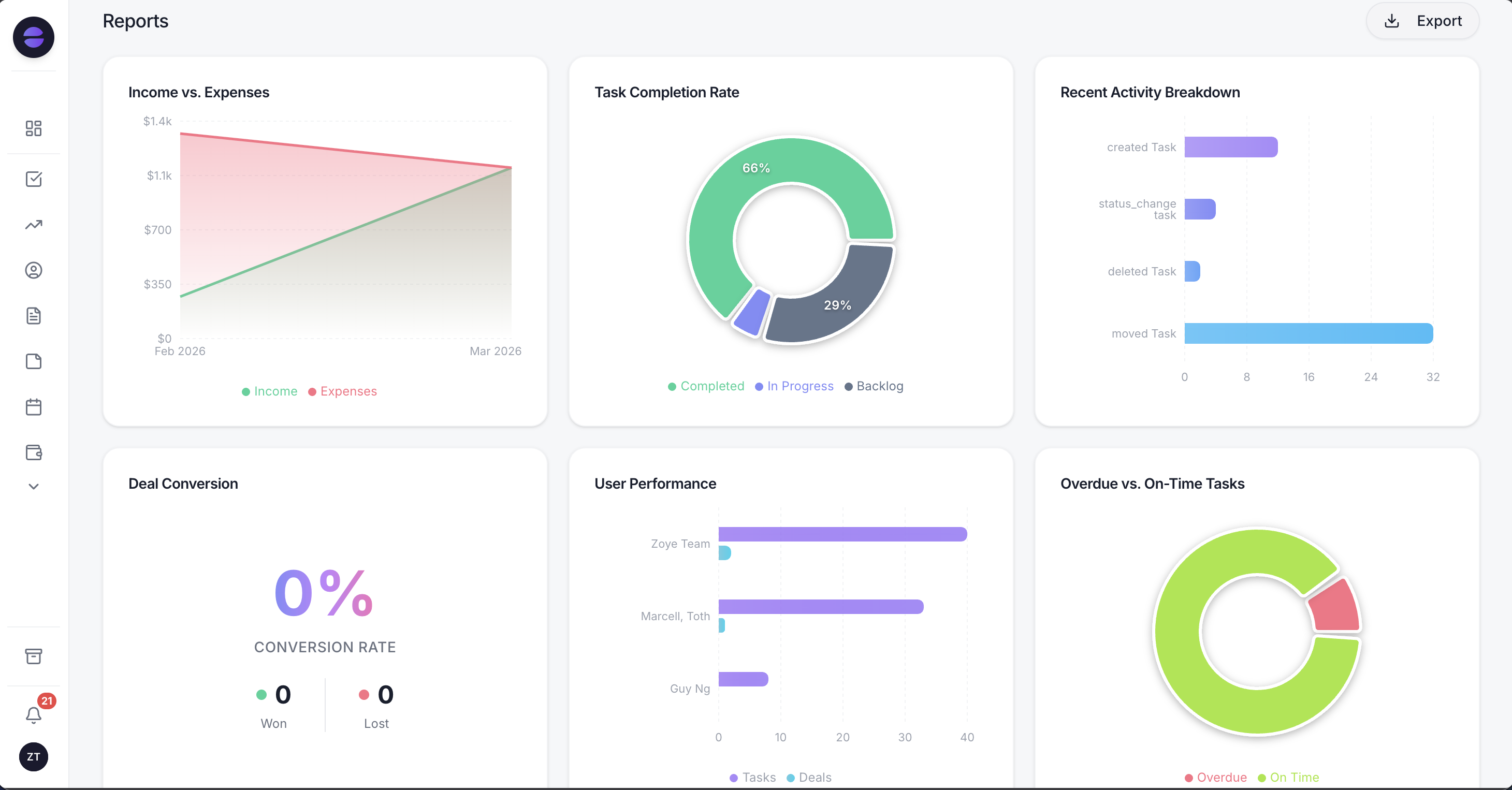 Reports pull owner, pipeline, task and invoice data into one place, so the monthly picture does not have to be rebuilt by hand.
In practice that means a few concrete things. Every homeowner enquiry becomes a lead with its source recorded, whether it arrived from a form, a referral, a Facebook or Instagram ad, or a WhatsApp message. The pipeline has stages you define, so you can see the eleven owners you spoke to this quarter and which four have gone quiet. Management agreements, insurance documents and property details live on the owner record instead of in an email thread. Tasks for onboarding a new property are a repeatable list rather than a memory test. Invoices go out on a schedule and chase themselves when they are late. Reports cover the company, not the calendar.
The part that changes the working day is the assistant. It operates the same records over WhatsApp, which is where a manager actually is: standing in a half-cleaned apartment, in a car between properties, or on a Sunday when an owner messages. Send a voice note after an owner meeting and it becomes a contact, a set of notes and three tasks with dates. Ask what is overdue and you get real figures from live data rather than a guess. Ask it to draft the follow-up to the owner who has not replied in ten days and it writes it for you to approve. Anything destructive or bulk asks first, and every automated run is logged and reversible.
Workflow automations cover the rules that a manager otherwise keeps in their head: respond to a new owner enquiry within minutes, flag a deal that has sat still for a week, start the onboarding checklist when an agreement is signed, chase an invoice that has passed its due date. You describe the rule as you would to a new hire, Zoye writes it back to you in plain English, and nothing runs until you approve it.
Pricing: Almost Free is $5 per month, or $4 per month billed annually, and covers 1 team member with 1GB of storage. Starter is $29 per month, or $23 annually, for 10 members and 5GB. Growth is $59 per month, or $47 annually, for 20 members and 10GB. Scale is $119 per month, or $95 annually, for 100 members and 25GB. Customize is quoted. Full details are on the pricing page.
Best for: managers running units for other owners who already have a property management system and need the owner side to stop living in their head.
See what Zoye can do for you
CRM, deals, tasks and your Instagram, Facebook and WhatsApp automations in one workspace. Just ask Zoye and it sets any of it up for you.
Explore FeaturesThe switching cost nobody prices
Every comparison article ends at the purchase. The expensive part starts afterwards, and it is worth understanding before you sign anything, because switching cost is the reason most managers stay on software they have already outgrown.
Four costs show up reliably.
Data that does not map. Your current system has fields the new one does not, and the reverse. Custom notes, owner-specific commission splits, historical statements and anything you stored in a free-text box tend to arrive as an unstructured lump or not at all. Budget time to decide what genuinely has to come across. Most of it does not.
The parallel period. For some weeks you run both systems, because you cannot switch a live calendar in one evening. Two systems means two places a change can be entered and one place it can be forgotten.
Retraining, including people who are not employees. Cleaners, maintenance contractors and part-time staff have habits built around your current tool. A new checklist app is a real change to somebody who is paid per clean and does not read email.
The confidence gap. For roughly a month you will not fully trust the new numbers, so you will check them against the old ones. That is time, and it is the cost that surprises people most.
None of that argues against switching. It argues for switching in an order that keeps the risk in the cheap places.
The migration order: owner records first, channel manager last
The correct sequence is close to the reverse of how people instinctively do it. The instinct is to move the biggest system first and get it over with. The safer order moves the lowest-risk data first and touches live bookings last.
One. Owner and enquiry records. Start here. It is the data most likely to exist only in a spreadsheet, a phone and somebody's memory, so it is the data you are most at risk of losing entirely. It is also the safest to move, because a mistake is invisible to guests and reversible in an afternoon. Bring across every owner, every property they own, every open enquiry with its source, and the next action for each. This alone usually surfaces two or three owners nobody had followed up.
Two. Documents and agreements. Management agreements, insurance certificates, key and access information, house manuals. Attach them to the owner or the property rather than to a folder tree, and record renewal dates as tasks while you have the documents open.
Three. Invoicing and owner-facing finance that is not a payout. Management fees billed outside the booking flow, linen and consumables, maintenance recharges. Get the recurring ones on a schedule.
Four. Internal tasks and turnovers. Move the team's work once the records they attach to already exist. Doing this before step one produces tasks with nothing to link to.
Five. Guest messaging. Templates and sequences. Test on a handful of real stays before switching everything over, and keep the old sequences until the new ones have fired successfully at least once at each stage of the stay.
Six. The channel connections. Last, deliberately, and ideally in your lowest-occupancy window. Move one property first and let it run for a full week including a real check-in and checkout. Only then move the rest, and check the unified calendar against each channel manually for the first few days.
Two rules make the whole sequence safer. Never move two layers in the same week, because when something breaks you will not know which change caused it. And keep the old system readable, not just cancelled, for at least one full billing and statement cycle after you finish.
Ready to hand off the busywork?
Zoye brings AI-powered CRM, task management, and automation into one workspace.
Get StartedHow to choose without a scoring spreadsheet
Scoring matrices tend to reward the vendor with the longest feature list, which is rarely the right answer. Four questions do more work.
Which layer is actually failing? Write down the last five things that went wrong. If four of them were calendar or channel problems, your money belongs at the top of the stack. If four of them were a forgotten follow-up, a missing agreement or an owner who felt ignored, no amount of PMS depth will help.
What is the smallest change that fixes it? The category rewards patience. Adding a dynamic pricing tool or a business layer next to a platform you already know is far cheaper than replacing that platform.
Does the vendor publish a price? As of September 2026, the two largest platforms in the category quote after a demo, which is normal for their segment but means you cannot compare on cost until you are already in a sales process. Others publish plans that scale with property count. Neither is wrong; knowing which you are dealing with sets your expectations for how long buying will take.
What happens on the day you leave? Ask about data export before you sign, not after. A vendor that answers clearly is telling you something useful about the relationship.
Why managers pick Zoye for the owner layer
The pattern is consistent among managers who add it. They already had the booking side solved and did not want to touch it. What they did not have was a system for the part of the business that grows the company rather than servicing it.
The owner pipeline stops being invisible. Every enquiry has a source, a stage and a next action, so the quarter's pitches are a list rather than a feeling.
The back office stops depending on memory. Agreements, renewal dates, onboarding checklists and invoices sit on the record they belong to, and the ones with deadlines chase themselves.
The assistant works where the manager works. WhatsApp and voice notes mean the update happens between properties instead of at eleven at night, which is the only reason the records stay current.
And it sits beside your property management system rather than arguing with it. Distribution and operations stay where they are. The owner layer finally has somewhere to live.
Take a look at how Zoye handles the owner side of a management company. Plans start at $5 per month.
For more context, see the vacation rental CRM page, the roundup of the best vacation rental software, the explainer on hospitality CRM, and the head to head on Guesty vs Hostaway.