
Pipedrive vs Zoho CRM 2026: Which CRM Wins, and the AI-Native Alternative to Both
Pipedrive and Zoho CRM sit on almost every short list when a growing team goes shopping for a sales tool, and they pull in opposite directions. Pipedrive is the simple, sales-pipeline-focused CRM that a small team can pick up in an afternoon and use to close more deals without a manual. Zoho CRM is the deep, highly customizable platform at the center of a sprawling business software ecosystem, cheaper per user but more complex to learn and to run.
The honest problem with the Pipedrive-vs-Zoho debate is that both answers leave the same gaps. Both are CRMs first, so your projects, your calendar, and your budget still live in other tools. Both gate their best AI behind higher tiers, and on both the AI mostly suggests rather than acts. And both bill per user, so the price climbs every time you hire. If you find the two genuinely hard to separate, that is often a sign the right answer is a different kind of tool entirely.
This comparison walks through the dimensions that actually decide the choice - ease of use, pipeline and sales features, customization, automation and AI, pricing, integrations, and support - and is fair about where Pipedrive and Zoho CRM each win. Then it covers the AI-native alternative both miss.
Pricing reflects published rates as of June 2026; check each vendor's pricing page for current figures.
Pipedrive vs Zoho CRM at a glance
| Dimension | Zoye | Pipedrive | Zoho CRM |
|---|---|---|---|
| Core philosophy | AI-native all-in-one workspace | Simple, pipeline-first sales CRM | Deep, customizable CRM in a big ecosystem |
| AI assistant | Included on every plan, takes action | AI Sales Assistant, suggests and forecasts | Zia - predictions and assistants, stronger on higher tiers |
| Ease of use | Same-day, AI does the setup | Very easy, ready in a day | Capable but more to learn |
| Pipeline / sales | Solid deals, stages, contacts | Best-in-class visual pipeline | Strong, deeply configurable |
| Customization | Custom fields, templates, flexible | Light, focused on selling | Near-unlimited, modules and custom objects |
| Automation | AI assistant acts across tools | Workflow automation, simpler | Powerful workflows, Blueprint, deep rules |
| Projects / tasks | Built in (board, calendar, timeline) | Light activities only | Via separate Zoho apps |
| Budget / finance | Built in | Not included | Via separate Zoho apps |
| Pricing model | Flat tier-based, not per user | Per user, mid-range | Per user, cheaper at most tiers |
| Entry plan | Almost Free, $5/mo, 1 member, full platform | No free CRM (trial only) | Free CRM for up to 3 users |
| Best for | All-in-one teams that want AI to act | Sales teams that want simplicity | Teams that want depth and a low price |
Ease of use and setup
This is the clearest split between the two, and the place each platform's philosophy shows most plainly.
Pipedrive is built to be obvious. The entire product is organized around a single visual sales pipeline, and within an hour of signing up a salesperson understands where deals sit, what to do next, and how to move a deal forward. There is very little to configure before the tool is useful, no assumption that you have an admin, and onboarding is genuinely guided. For a small, sales-led team that wants to be selling rather than configuring, Pipedrive is the more comfortable place to start.
Zoho CRM trades some of that simplicity for capability. It is far from hard to use, but it has more screens, more settings, more modules, and more decisions to make before it fits your process. The depth that makes Zoho powerful also makes the first week longer, and larger Zoho deployments often benefit from someone who owns the configuration. The payoff is a CRM that bends to almost any workflow once it is set up.
Zoye takes a third path on setup: instead of you configuring the CRM, you describe what you want in plain language and the assistant builds it. You can be running a real pipeline the same day without touching a settings screen.
Verdict: Pipedrive wins on ease of use and time-to-value. For a team that wants to start selling today with no configuration project, it is the smoother ramp.
Want to see it in action?
Watch how Zoye automates your daily workflow - from lead management to team collaboration.
See How It WorksPipeline and sales features
Both platforms are real sales CRMs, but they emphasize different strengths.
Pipedrive's pipeline is its signature. The drag-and-drop visual pipeline, activity reminders, deal rotting alerts, and clean reporting are tuned to keep a sales team moving deals forward. Pipedrive does the core job of a sales CRM - track deals, never drop a follow-up, see where the pipeline is healthy or stuck - exceptionally well, and it resists the feature bloat that buries that clarity in heavier tools.
Zoho CRM matches the core and adds reach. It has pipelines, multiple pipelines, forecasting, territory management, sales signals, and a long list of sales features that go beyond Pipedrive's focused set. For teams with complex sales motions, multiple products, or layered approval processes, Zoho can model more of it inside one CRM. The trade-off is that all of that depth is more to set up and maintain.
Verdict: Pipedrive wins for a focused, single-pipeline sales motion that values clarity. Zoho CRM wins when your sales process is complex enough to need its extra depth.
Customization and flexibility
This dimension favors Zoho, and it is one of the platform's main selling points.
Zoho CRM is highly customizable. Custom fields, custom modules, custom objects, layout rules, validation rules, and the broader Zoho developer platform let you shape the CRM to mirror your exact business rather than bending your business to the tool. If a capability does not exist out of the box, there is usually a setting, a module, or a sibling Zoho app for it. For teams that need the CRM to fit a non-standard process, this flexibility is hard to beat at the price.
Pipedrive is intentionally lighter here. You get custom fields, custom pipelines, and a reasonable amount of tailoring, but Pipedrive deliberately stays focused on selling rather than becoming a build-anything platform. That focus is a feature for teams that want a clean sales tool, and a limitation for teams that need to model a lot of custom data and logic.
Verdict: Zoho CRM wins on customization and flexibility by a wide margin. Pipedrive's restraint is a strength for simplicity but a ceiling for complex needs.
Automation and AI
Both platforms automate and both have AI, and here the comparison gets more interesting against an AI-native option.
Zoho has the deeper automation. Workflow rules, Blueprint process management, and a rich set of triggers and actions let you automate complex sequences inside the CRM. Its Zia AI offers lead and deal predictions, scoring, anomaly detection, and assistants, with the strongest features on higher tiers. For teams that want to encode a detailed process, Zoho's automation engine is powerful.
Pipedrive keeps automation approachable. Its workflow automation handles the common cases - assign, follow up, move stage, notify - without much setup, and its AI Sales Assistant surfaces suggestions and forecasts inside the pipeline. It is lighter than Zoho's engine, which is exactly the point for a team that wants automation without becoming automation engineers.
The shared limit is what the AI actually does. On both Pipedrive and Zoho, the AI mostly suggests, predicts, and summarizes inside the CRM. It does not reach across your projects, your calendar, and your budget to take action, because those things live in other tools.
Verdict: Zoho wins on automation depth, Pipedrive on automation simplicity. Both AIs assist inside the CRM rather than act across your whole business.
See what Zoye can do for you
From CRM and deal tracking to AI-powered task management - explore everything Zoye offers in one workspace.
Explore FeaturesPricing and value
Pricing is where Zoho lands its strongest blow against Pipedrive, while both share the per-user problem.
Pipedrive pricing is mid-range and tiered, from an Essential plan around $14/user/month up through Professional and Power to an Enterprise plan around $99/user/month, with the features most growing teams want (automation, deeper reporting) on the middle and upper tiers. There is no free CRM, only a trial.
Zoho CRM pricing is cheaper at most tiers, with a free CRM for up to 3 users and paid plans (Standard, Professional, Enterprise, Ultimate) that generally undercut the comparable Pipedrive plan. For a price-sensitive team that wants real customization, Zoho delivers a lot of CRM per dollar.
The 20-person team math:
- Pipedrive Professional: 20 x around $49 = about $980/month
- Zoho CRM Enterprise: 20 x around $40 = about $800/month
- Zoye Growth (20 members, AI + CRM + projects + budget included): $59/month
The pattern is clear. Zoho is the cheaper of the two at most tiers and adds a free entry plan, while Pipedrive charges a premium for its simplicity. Both are per user, so both grow with headcount, and neither bundles the projects, calendar, and budget that a running business also needs.
Verdict: Zoho CRM wins on price and value among the two. Both punish growth through per-user pricing, and neither includes the rest of how a business runs.
Integrations and ecosystem
Both connect widely, but Zoho's ecosystem is a category of its own.
Zoho's ecosystem is enormous. Zoho CRM sits inside a suite of 50-plus business apps - mail, projects, books, desk, campaigns, and more - that share data and login. For a team willing to standardize on Zoho, that breadth means most business needs have a first-party answer that plugs straight into the CRM. It is one of the strongest arguments for choosing Zoho.
Pipedrive integrates well but stays a specialist. Its marketplace covers the popular sales, email, and productivity tools most teams need, and it connects cleanly to the rest of your stack. Pipedrive is happy being the focused sales CRM in a wider toolkit rather than the center of an all-Zoho world.
Verdict: Zoho CRM wins on ecosystem breadth for teams that want one vendor for many apps. Pipedrive wins for teams that want a focused CRM that plays nicely with their existing tools.
Support and scalability
Both scale, with different profiles as you grow.
Zoho scales into complexity. Its depth, customization, and ecosystem let it support larger teams with intricate processes, and its higher tiers add the controls and capacity bigger organizations need. The cost of that scale is the admin time and learning the platform demands as you push it.
Pipedrive scales while staying simple. It grows comfortably with a sales team and keeps its clarity as you add seats, which is part of why teams stick with it. Where it stops scaling is in scope: it stays a sales CRM, so heavy customization or a wider business platform is not its job.
Both offer tiered support, with faster and more hands-on help on higher plans. Neither removes the underlying reality that, as you grow, the per-user bill grows with you.
Verdict: Zoho CRM scales into depth and breadth, Pipedrive scales while staying simple. Both tie cost to headcount as you grow.
Where Zoye fits: the AI-native alternative to both
Here is the gap that the Pipedrive-vs-Zoho debate never closes. Both are CRMs first. Your projects, your team's tasks, your calendar, and your budget still live in other tools, and you stitch them together with integrations or spreadsheets. Both gate their strongest AI behind higher tiers, and on both, the AI mostly suggests rather than acts. And both bill per user, so the cost grows with every hire.
Zoye was built to close exactly those gaps. Contacts, companies, deals, and stages sit in the same workspace as tasks, projects, calendar, budget, and reports, so there is nothing to stitch together. A personal AI assistant is included on every plan, and it does the work rather than just recommending it: one text or voice instruction can create the deal, add the contact, open the follow-up task, and book the meeting in a single pass.
 Zoye combines a real CRM with native projects, calendar, and budget, plus an AI assistant that acts
Where Pipedrive gives you a clean sales pipeline and Zoho gives you deep customization, Zoye gives you a solid CRM connected to the rest of how your business actually runs. The Zoye Assistant does not just summarize records. It creates tasks from an incoming email, opens a deal and files the contact from one instruction, schedules a meeting around your deadlines, reassigns workload by team capacity, surfaces overdue and blocked work proactively, and generates a weekly status report on demand. It acts, it does not just suggest.
 Tasks and projects live in the same workspace as your CRM, with board, list, calendar, and timeline views
That is the part neither competitor offers. In Pipedrive or Zoho, a closed deal lives in the CRM, the delivery work lives in a separate project tool, the kickoff lives in a separate calendar, and the budget lives in a spreadsheet. In Zoye, they are one connected workspace, so the assistant can move across them in a single step.
 Deadlines and meetings appear on the Zoye calendar automatically, with no sync setup to maintain
Pricing is flat, not per user. The entry plan is Almost Free and covers 1 member with the full platform including AI. Starter is $29/month for up to 10 members, Growth is $59/month for up to 20, and Scale is $119/month for up to 100. A 20-person team gets a CRM, projects, calendar, budget, reports, and an action-taking AI assistant for a flat $59/month.
 Reports pull deals, tasks, finances, and team data into one exportable view across the workspace
Zoye also keeps your notes in the same workspace, so meeting notes, account context, and follow-ups sit next to the deals and tasks they belong to instead of in a separate app. And with WhatsApp live today, plus Gmail and Google Calendar, you can manage real customer conversations from the same place you manage the pipeline.
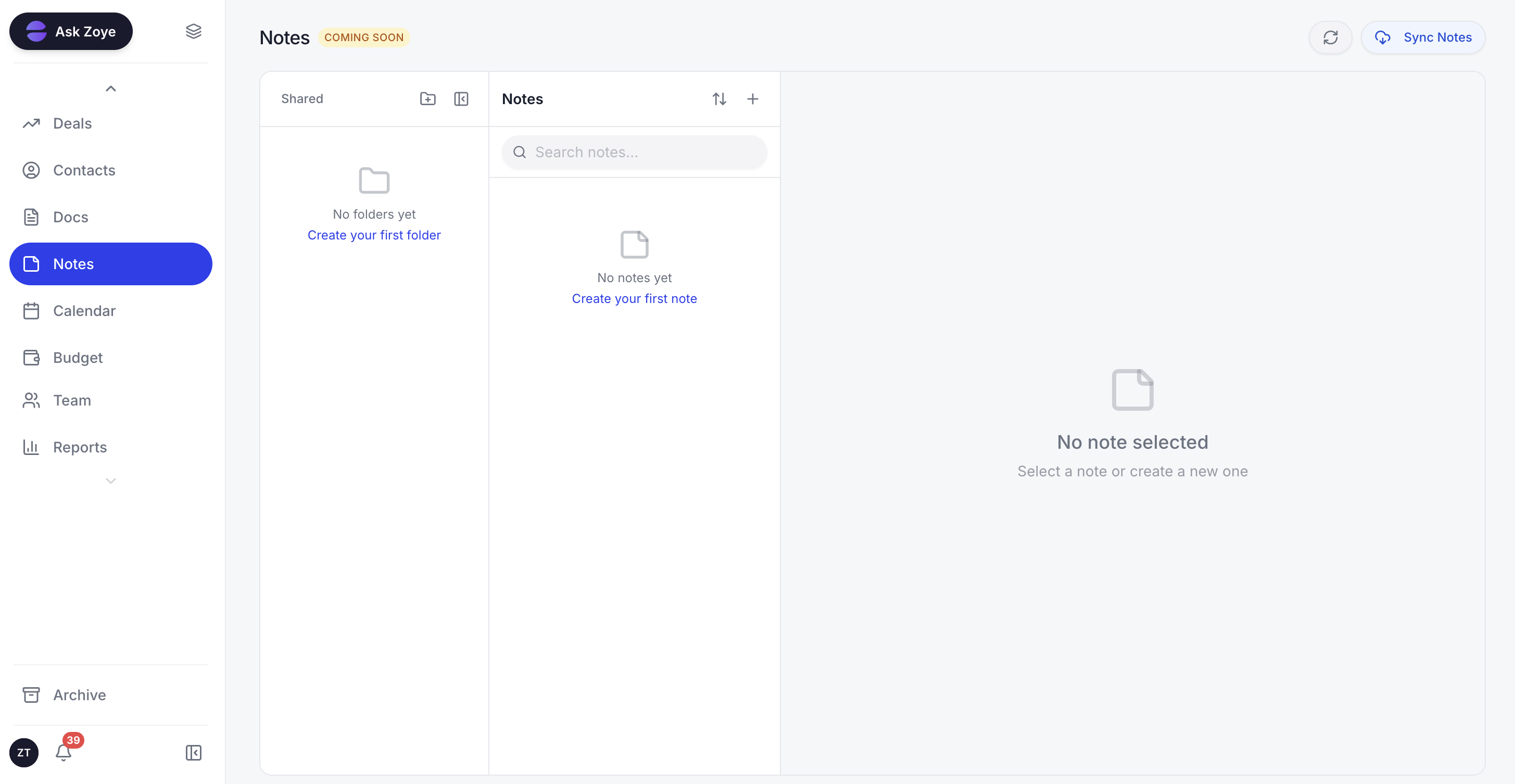 Notes live alongside deals, tasks, and contacts, so context never gets lost in a separate tool
Real example: A 15-person agency owner finishes a client call and dictates one line on her phone: "zoye.io signed the retainer, about $24K, kickoff next Tuesday." Zoye opens the deal, files the contact, books the kickoff on the calendar, drafts the delivery tasks, and logs the budget. In Pipedrive that is the CRM plus a separate project tool plus a spreadsheet; in Zoho it is the same, after the modules have been configured to make it possible.
Ready to streamline your business?
Zoye brings AI-powered CRM, task management, and automation into one workspace.
Get StartedWhen to choose each
Choose Pipedrive if:
- You want a sales CRM that is easy to learn and fast to launch without an admin
- A single, clear visual pipeline is the heart of how your team sells
- You value simplicity and focus over deep customization
- Your team is sales-led and wants to be selling on day one
Choose Zoho CRM if:
- You want deep customization, custom modules, and the lowest per-user price of the two
- You plan to standardize on one vendor across many business apps
- Your sales process is complex enough to need forecasting, Blueprint, and rich automation
- You can invest the setup time to make all that depth fit your process
Choose Zoye if:
- You want an AI assistant that takes action included on every plan
- You need a CRM plus projects, calendar, and budget in one connected workspace
- You prefer flat tier-based pricing over per-user charges that grow with hiring
- You want to be operational the same day with no configuration project
- You want to manage customer conversations, including WhatsApp, from one place
Frequently asked questions
It depends on what you need. Zoho CRM is deeper, more customizable, and cheaper per user, which suits teams that want one platform to model a complex process and grow into a wider ecosystem. Pipedrive is simpler and faster to run a sales pipeline, which suits sales teams that want clarity over configuration. Neither is universally better - Zoho wins on depth and price, Pipedrive wins on focus and simplicity.
For a small, sales-led team that wants to be selling within a day, Pipedrive is the friendlier starting point because its pipeline is clear and there is little to configure. Zoho CRM is the better choice for a small business that wants room to customize, add modules, and keep costs low as it grows. Both bill per user, so it is worth weighing an all-in-one option before committing.
Yes, at most tiers Zoho CRM is cheaper per user than the comparable Pipedrive plan, and Zoho also offers a free CRM for very small teams. The catch is that Zoho's lower price comes with more complexity and a longer setup. Both still bill per user, so the total cost climbs with every hire on either platform. (Pricing as of June 2026 - check each vendor's pricing page.)
Pipedrive, by a clear margin. It was built around a single visual sales pipeline, the interface is clean, and most teams are productive within a day. Zoho CRM is more powerful but has more screens, settings, and modules to learn, and it often rewards a dedicated admin. If time-to-value matters most, Pipedrive is the easier ramp.
Both have AI, and both gate it. Pipedrive's AI Sales Assistant gives suggestions and forecasts inside the pipeline. Zoho's Zia offers predictions, lead scoring, and assistants, with the strongest capabilities on higher tiers. On both, the AI mostly suggests and predicts inside the CRM rather than taking action across your tasks, calendar, and budget.
Yes - Zoye is built for teams that want what neither covers in one place: CRM plus projects, calendar, and budget in a single workspace, with an AI assistant included on every plan that takes real action rather than just suggesting. Pricing is flat and tier-based instead of per user, so a 20-member team pays $59/month on Zoye Growth with AI, CRM, projects, and budget all included.
The bottom line
Pipedrive and Zoho CRM are both strong sales CRMs pulling in different directions. Pipedrive is the simple, pipeline-first tool that a sales team can adopt in a day and actually use, trading deep customization for clarity and focus. Zoho CRM is the deep, highly customizable platform with a huge ecosystem and a lower per-user price, trading a longer setup and a steeper learning curve for the ability to model almost any process inside one suite.
The real question for 2026 is not just which of the two wins, but whether either is built for how your whole business runs. Both are CRMs first, so projects, calendar, and budget live elsewhere. Both gate their best AI behind higher tiers, and on both the AI mostly suggests rather than acts. And both bill per user, so the cost climbs with every hire.
If you need one AI-native workspace with a CRM, projects, calendar, and budget, an assistant that takes real action across all of them, and flat pricing that does not punish growth, the honest answer is neither Pipedrive nor Zoho. Zoye is built for that team, with everything included on every plan and operational the same day you sign up.
For more context, see our guides to the best Pipedrive alternatives, the best Zoho CRM alternatives, how to choose a CRM, and the best AI CRM alternatives to HubSpot.