Search "WhatsApp Business API pricing" and you get a wall of conflicting numbers, vendor calculators, and a pricing model that Meta keeps changing. One page says it is free, the next quotes fractions of a cent per message, a third talks about "conversations" and 24-hour windows, and none of it tells a busy owner the one thing they want to know: what will this actually cost my business, and do I even need it?
The confusion is not your fault. WhatsApp Business API pricing is genuinely layered. There is what Meta charges, there is what the provider you sign up through charges on top, there are different rates for different message types, and the rates differ by country and change from year to year. It is easy to sign up expecting "free WhatsApp" and get a bill you did not plan for, or to over-engineer an expensive API setup when the free app would have done the job.
This guide cuts through it. It explains, in plain language, how WhatsApp Business API pricing works in 2026, who actually needs the API versus the free WhatsApp Business app, the message categories that drive your bill, the provider markups nobody warns you about, and how to avoid overpaying. Rates move, so the goal here is to make you fluent in the model, not to quote exact numbers that will be stale next quarter.
Pricing reflects the model Meta published as of October 2026, including the changes that took effect on 1 October 2026; WhatsApp rates vary by country and can change at the start of each quarter, so always check Meta's current pricing for exact figures.
First, do you even need the WhatsApp Business API?
Before any pricing question, answer this one, because for most small businesses the honest answer is no.
There are two different WhatsApp products for businesses, and people constantly confuse them. The WhatsApp Business app is the free app you download on a phone. It gives you a business profile, a catalog, greetings, away messages, quick replies, and labels. It is manual, it runs on one device, and it costs nothing. For a solo owner or a small team answering chats by hand, it is often all you need.
The WhatsApp Business Platform, usually called the WhatsApp Business API, is a different thing entirely. It has no app and no chat screen of its own. It is a connection that lets other software send and receive WhatsApp messages programmatically: automation, chatbots, multiple agents on one number, bulk template sends, and integration with your CRM or helpdesk. This is the product that has "pricing," because this is where messages get charged.
So the first cost-control decision is not about rates at all. It is whether you need the API. You need it when you have outgrown a single phone: you want several people on one number, you want automated replies and follow-ups, you send notifications at volume, or you want WhatsApp wired into your other tools. If none of that is true yet, the free app is the cheaper, simpler answer, and this whole pricing conversation can wait.
How WhatsApp Business API pricing actually works
Here is the model in one paragraph, then the detail. Historically, Meta charged per conversation: a 24-hour window that opened when the first message was delivered, with everything inside that window bundled into one charge. Since July 2025, Meta bills per delivered message instead: each billable message is priced individually by message category and recipient country, rather than by conversation window. You may still see the old conversation model described online, but it no longer reflects how you are billed. Meta does not charge for messages customers send to you.
Two variables drive almost every charge:
The message category. Not all messages cost the same. A promotional blast is priced differently from an order update, which is priced differently from a login code. The category of the message you send determines the rate (more on the categories below).
The recipient's country. WhatsApp rates are set per country and vary enormously. A message to a number in one market can cost many times what the same message costs in another. India, for example, has historically had some of the lowest per-message rates, while several Western markets sit much higher. If you message customers across borders, your blended cost depends on where they are.
On top of those two, there is usually a third layer that has nothing to do with Meta: the fee charged by whoever you access the API through. That layer catches a lot of people out, so it gets its own section below.
The practical takeaway: your WhatsApp API bill is roughly the number of billable messages you send, times the rate for each message's category and destination country, plus your provider's fees. Everything else is detail on top of that skeleton.
What changed on 1 October 2026. Meta made changes that matter for small businesses. Each business phone number now gets 1,000 free service messages per month (unused ones do not roll over), and service messages beyond that are charged. Utility templates sent inside an open customer service window, which were free from July 2025 to 30 September 2026, are charged again. The free entry point stays: when a customer starts a chat from a click-to-WhatsApp ad or a Facebook Page call-to-action button and you answer within the window, a window of up to 7 days opens in which marketing, utility, authentication, and service messages are all free (only Meta Business Agent messages, Meta's own AI agent product, are still charged). Outside that window, marketing templates are always charged per delivery, and Meta changes rates only at the start of a quarter.
Want to see it in action?
See Zoye catch a new lead, answer on WhatsApp and set up the follow-up, all from one message.
See How It WorksTemplate messages vs service messages
The single most important pricing concept is the difference between a message you start and a message the customer starts.
Service messages (customer-initiated). When a customer messages you, a customer service window opens for 24 hours from their last message, and inside it you can reply freely with regular (non-template) messages. Since 1 October 2026, each business phone number gets 1,000 free service messages per month; beyond that, service messages are charged per delivery like any other category. For a business that mostly answers people who messaged first, that allowance can still cover a good share of the traffic, but a busy inbox will pass it.
Template messages (business-initiated). When you want to message a customer outside that window, or start a conversation yourself, you must use a pre-approved template, and template messages are charged. Templates fall into categories, and the category sets the price:
- Marketing templates are promotions, offers, product announcements, and re-engagement. These are typically the most expensive category, because they are the ones Meta most wants to meter.
- Utility templates are transactional: order confirmations, shipping updates, appointment reminders, payment receipts. These usually cost less than marketing, and since 1 October 2026 they are charged even when sent inside an open customer service window.
- Authentication templates are one-time passcodes and verification messages. These are priced separately, often low, and in some markets are billed differently again.
The lesson for your bill is direct: the more of your traffic is service replies within the monthly free allowance, chats inside a free entry point window, and lower-cost utility messages, and the less you lean on mass marketing templates, the cheaper WhatsApp is to run. A business that mostly answers inbound chats pays far less than one that blasts marketing to a big list.
What changed in 2026 (and why old guides mislead you)
If you are reading older articles, you will hit two outdated ideas that no longer match reality.
"You get 1,000 free conversations a month." The old conversation-based model included a monthly free tier of 1,000 service conversations, and that tier is long gone. Since 1 October 2026 there is a new allowance that sounds similar but works differently: each business phone number gets 1,000 free service messages per month, counted per message rather than per conversation, with no rollover, and every service message beyond that is charged. Template messages never count toward it. Do not budget around a number you read in a 2024 blog post.
"It's all about 24-hour conversation windows." The 24-hour customer service window still decides when you can send regular replies instead of templates, but the billing unit is now the individual delivered message, not the conversation. Guides written around the conversation model can overstate or understate your cost depending on how you actually message.
"Service replies and utility messages in the window are always free." That was true from July 2025 to 30 September 2026. Since 1 October 2026, service messages are free only up to 1,000 per business number per month, and utility templates sent inside an open window are charged again.
The safest posture in 2026 is to understand the shape of the model (per delivered message, by category, by country, a monthly free allowance of service messages, a free entry point window from ads and Page buttons) and to verify the live rates on Meta's official pricing page whenever you plan a campaign or budget. Anyone quoting you an exact, unchanging price is simplifying something Meta deliberately keeps fluid.
The hidden cost: BSP markups and platform fees
Here is the layer that surprises people most. You almost never buy the WhatsApp Business API directly from Meta in a way you use raw. You reach it through a Business Solution Provider (BSP) or a platform built on the API: the tools that give you an inbox, automation, a dashboard, and support.
That provider sits between you and Meta, and it charges for the service. Providers price in several ways, and the differences are large:
Per-message markup. Some add a margin on top of Meta's per-message rate, so every message costs a little more than the raw Meta price.
Monthly platform fee. Many charge a fixed monthly subscription for the software (the inbox, the automation, the seats), separate from the messaging that passes through to Meta.
Per-agent or per-seat fees. Team-inbox tools often charge per agent, so cost scales with headcount, not just message volume.
Setup and add-ons. Onboarding fees, verified business "green tick" assistance, extra numbers, and premium support can all appear as line items.
None of this is hidden maliciously; it is just that "WhatsApp API pricing" in a headline usually means Meta's message rates, while your real bill is Meta's rates plus the provider's fees. When you compare providers, compare the total: the platform fee, the per-message markup, and the per-seat cost together. A provider with a low sticker price and a high per-message markup can cost more than one with a higher subscription and pass-through messaging, depending on your volume.
See what Zoye can do for you
CRM, deals, tasks and your Instagram, Facebook and WhatsApp automations in one workspace. Just ask Zoye and it sets any of it up for you.
Explore FeaturesHow to estimate your WhatsApp API bill
You can get a workable estimate without a spreadsheet full of guesses. Walk through four numbers.
1. How many conversations do customers start? Estimate the monthly volume of chats where the customer messages you first. Your replies in these chats are service messages, and the first 1,000 per business number each month are free, so a business that is mostly reactive has a low messaging cost. Count your monthly replies: anything above 1,000 per number is billable.
2. How many template messages will you send, and of what type? Separate your business-initiated messages into marketing (promotions), utility (order and appointment updates), and authentication (codes). The marketing count is the one that moves your bill the most.
3. Where are your customers? Group your recipients by country and apply the right rate band. A domestic business in a low-rate market pays very differently from one messaging across expensive markets.
4. What does your provider add? Layer the BSP's monthly fee, per-message markup, and per-seat charges on top. This is often the larger half of the bill for a low-volume business.
Multiply message counts by the correct category-and-country rate from Meta's live pricing, add the provider fees, and you have a realistic monthly figure. The exercise usually reveals one of two things: either your usage is small enough that the free app would do, or your cost is dominated by marketing templates and provider fees you can trim.
How to avoid overpaying for the WhatsApp Business API
Once you understand the model, the savings are obvious.
Use your free service allowance and free entry points. Design your customer experience so people message you first when they can, and answer promptly with regular replies, which draw on the 1,000 free service messages each number gets per month. When you advertise, use click-to-WhatsApp ads or Page buttons so new chats open a free entry point window of up to 7 days. Reactive support on WhatsApp can still be remarkably cheap.
Use utility, not marketing, where you can. An order update or appointment reminder is a utility message and costs less than a marketing template. Frame genuinely transactional messages as utility templates rather than dressing them up as promotions.
Stop mass-blasting. Marketing templates to a huge, unsegmented list are the fastest way to run up a bill and, worse, to get flagged for low quality. Fewer, targeted marketing messages cost less and perform better.
Compare providers on total cost. Do not choose on the headline. Add the platform fee, the markup, and the per-seat cost, then map it to your real volume. The cheapest provider at 500 messages a month is not the cheapest at 50,000.
Question whether you need the API at all. The biggest overpayment is buying an API setup, a provider subscription, and per-agent seats to solve a problem the free app already handles. Adopt the API when volume, automation, or team size genuinely demand it, not because it sounds more professional.
And there is a different way to get the outcome entirely, without becoming an expert in Meta's rate cards at all.
How Zoye handles this for you
Most owners do not actually want to manage WhatsApp API pricing. They want the result: customers answered, leads captured, follow-ups sent, nothing slipping. The pricing model is a means to that end, and wrestling with categories, windows, and provider markups is overhead they never asked for.
Zoye is an AI Business Operator that runs your business, and it connects to WhatsApp so you get the outcome without living inside the API. Instead of you configuring templates and reconciling per-message rates, Zoye connects the channel and the Zoye Assistant runs the conversations: it reads an incoming message, drafts the reply, captures the chat as a contact, opens a deal in your pipeline, and sets the follow-up so the lead does not go cold. You never open a rate card to do any of it.
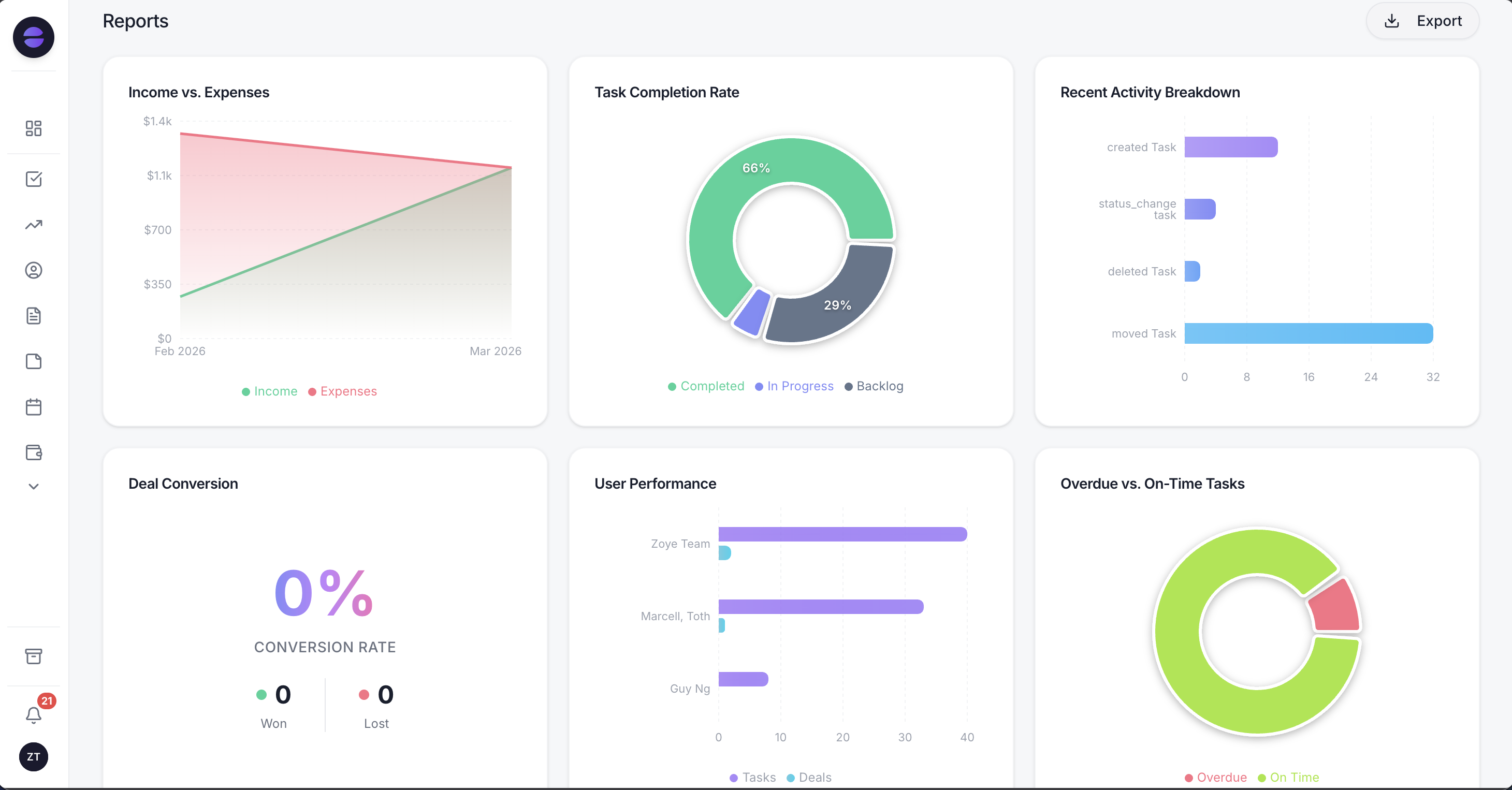 Zoye turns every conversation and follow-up into activity you can see and measure, instead of a messaging bill you have to decode.
The part that matters for cost and effort is that you run Zoye by talking to it. You can tell Zoye "message everyone who asked about pricing this week and did not reply," or "remind me about every open quote each Monday," and it builds and runs that as an automation. There is no flow-builder to learn, no templates to hand-configure, and nothing to maintain. Non-technical owners describe the outcome they want and the operator handles the mechanics. You can drive the whole thing from WhatsApp or Slack, not just a dashboard.
Behind the conversation, Zoye is a full workspace: a CRM that keeps contacts and deals current automatically, tasks with list, board, calendar, and timeline views, a shared calendar, budget tracking, and reports that pull it all together. So a WhatsApp chat is not a dead end that vanishes into one phone or a metered inbox. It becomes a contact, a follow-up, and the next action, automatically, and it feeds the rest of your business. To be clear about scope: Zoye is the operator that runs your customer conversations and the work behind them, not a raw API reseller whose job is to expose Meta's rate card to you. That is the point. You get the messaging outcome without the messaging math.
Why teams pick Zoye
A few themes come up consistently.
You get the outcome, not the overhead. Customers get answered and followed up with, without you learning Meta's categories, windows, and country rates or reconciling a provider's markup every month.
You run it by talking to it. Describe what you want, on WhatsApp or Slack, and Zoye builds and runs the automation. Nothing to configure, nothing to maintain.
It runs the whole business, not just the chat. Every conversation becomes a contact, a deal, and a follow-up inside one workspace that also holds your tasks, calendar, budget, and reports, so WhatsApp feeds your operation instead of sitting in a silo.
Ready to hand off the busywork?
Zoye brings AI-powered CRM, task management, and automation into one workspace.
Get StartedTry Zoye with your team. The entry plan is Almost Free, with the core tools.
For more context, see how to sell on WhatsApp, the best free WhatsApp chatbot options, and our guide to WhatsApp automation in 2026.
See the six automations Zoye ships for this, and how each one stays inside WhatsApp's rules, on the WhatsApp Automations page.